A Monday at Greenfield
One school day, end to end.
Six steps, in the order they happen. Every screen below is a photograph of the running product with a demonstration school’s data in it — not a drawing, and not a screen we intend to build.
For familiesLooking for your child’s school rather than for school software? Find a school.
01 / 06 · Enquiry
A parent asks about a seat
A message on WhatsApp becomes an enquiry, an enquiry becomes an application, and an application becomes an admitted student — carrying the same record the whole way. Nobody retypes a name between the front desk and the register, and nothing is lost when the person who took the call is away.
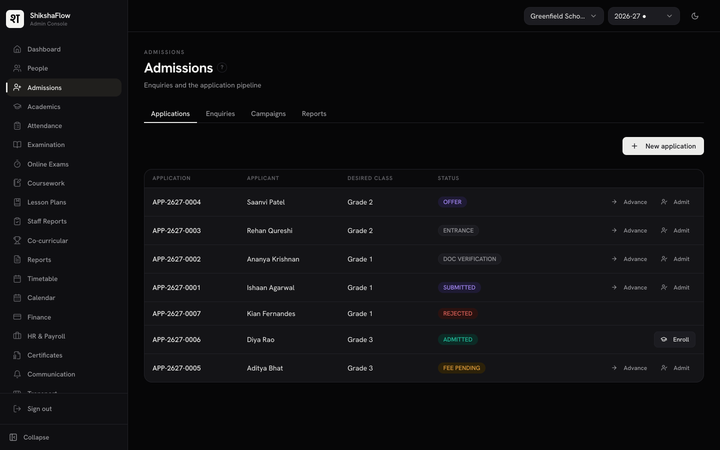
ADMISSIONS — ENQUIRIES AND APPLICATIONS, WITH WHERE EACH ONE STANDS 02 / 06 · The register
The register is marked, in one pass
A teacher marks a whole section at once — a tap per child, not a form per child — on a laptop or a phone. Your school sets the hours during which marking is open. Outside them the office can still record or correct a day, and every correction is kept.
A teacher marking daily attendance for a class section, each student on one row with a present-or-absent control.
ATTENDANCE — A SECTION BEING MARKED FOR THE DAY 03 / 06 · Assessment
Marks are entered once
The teacher who taught the subject enters the marks, and the marks card a parent is handed is generated from those same rows — one document, computed rather than retyped. The card and the register cannot drift apart, because there is only one of each number.
The marks entry screen, showing subject marks being recorded for a section.
MARKS ENTRY — BY SUBJECT, BY SECTION 04 / 06 · Fees
A fee becomes a receipt
Set what each class pays by fee head and instalment, then raise a term’s invoices for a whole grade in one action. Late fees, sibling concessions, RTE exemptions and upfront discounts are settings your office changes — not code somebody has to ship, and not a rule baked in by a vendor who has never seen your state’s circular.
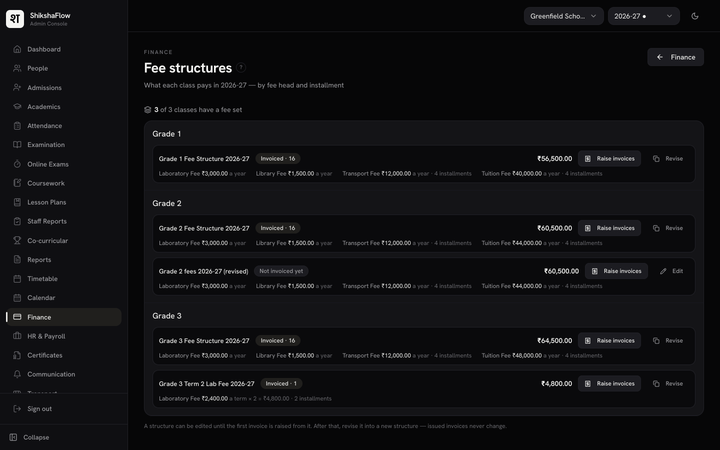
FEE STRUCTURES — WHAT EACH CLASS PAYS, BY HEAD AND INSTALMENT 05 / 06 · The family
The family sees the same thing you do
One login per family, with every child on it. Attendance, marks, fees, notices and documents — the same numbers the school sees, at the moment the school sees them. On the web and on the phone, so the office spends its mornings on school rather than on the same four questions.
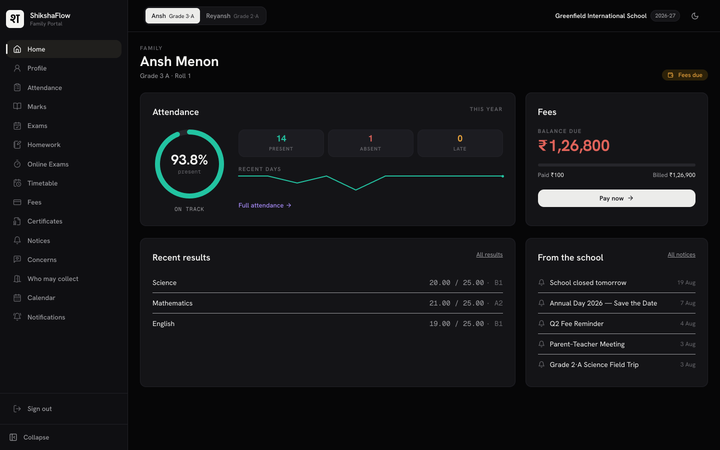
THE FAMILY PORTAL — A PARENT’S VIEW OF THEIR CHILD 06 / 06 · The record
Nothing is unaccounted for
Every action on a student record or on money is written to an append-only, hash-chained trail: who did what, when, from where, and why. It cannot be edited or deleted — not by a teacher, not by an administrator, not by us. That is what makes this a system of record rather than a set of screens.
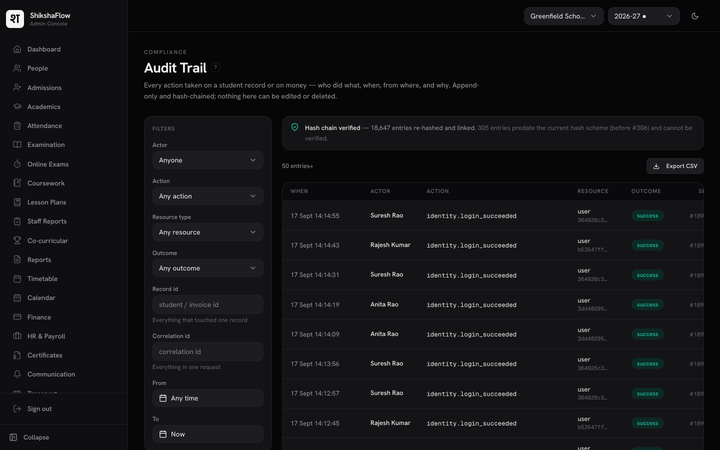
THE AUDIT TRAIL — APPEND-ONLY, HASH-CHAINED, VERIFIABLE


And it is one system
Not six products that talk to each other.
The register the teacher marked is the register the marks card counts, and the fee the office raised is the fee the parent pays. One record, one school year, one trail — which is the part that is hard, and the part that decides whether any of this is true a year from now.
Talk to us
Run a school? Talk to us.
Looking for one? We’ll point you.
Scan the code, or tap the button, and you’ll be talking to us on WhatsApp. We’ll ask which of the two you are, then five short questions if you run a school — the name, the city, roughly how many students, your role, and when suits you for a call.
We keep what you tell us to have that conversation, and nothing else. Reply STOP at any time. See our privacy notice.